Email Automations Are Live: Stop Sending Emails One by One
The moment a coach manually sends the same welcome email for the tenth time is the moment they should know something is broken in their workflow.
Sending emails one by one is what you do when you have three clients. When you have thirty, or a hundred, it becomes the thing that prevents you from actually coaching. You spend your afternoon in your inbox instead of your calendar. Sales follow-ups get delayed. Abandoned purchases sit unpursued. And the connection you could be building with new clients never happens because you are still typing out variations of "Welcome to my program."
We built Email Automations to solve this. It is a system that handles the emails that should not require your personal time. The welcome messages. The reminders. The recovery attempts for abandoned purchases. All sent automatically, all personalized, all tied to the exact moments when they matter most.
Here is what it does, why it changes things, and how to use it.
What Email Automations Actually Do
Email Automations lets you set up personalized emails that send automatically based on what happens in your Coachli account. You define the trigger. You write the email. Coachli sends it at the right moment, every single time, without you lifting a finger.
Think of it like this: you are not automating your coaching. You are automating the administrative layer that sits between a client action and your response. The difference is massive.
Instead of your sequence being "client buys something → you manually send welcome email → client waits while you get around to it," your sequence becomes "client buys something → Coachli immediately sends personalized welcome email → client is onboarded before you even know they exist."
That is not just faster. It is also more consistent. Every single client gets the same quality onboarding. No one slips through because you were busy. No one feels forgotten because the email arrived three days late.
The Two Triggers That Handle Most of Your Communication
Coachli currently supports two types of email automation. Both are designed around the moments that matter most in a client lifecycle.
Trigger 1: After Purchase (Immediate Welcome and Onboarding)
The moment someone buys your offering, an email can go out immediately or after a delay you set. This is where you do the work that prevents confusion and builds momentum.
Welcome a new client. Share what they should do next. Send a link to the resource they need to access right now. Set their expectations for what happens next. Answer the questions every new client has: "What do I do now? When does this start? Where do I go?"
An example automation: When someone buys your online coaching program, Coachli sends an email immediately with your welcome message, a link to log in and see the first lesson, and a calendar link to book their first session. That email does more to set the tone for success than almost anything else you can do.
Another example: When someone books a one-on-one session, you send an email confirming the details, with a reminder about what to prepare, and your video session link, all automatically. No back-and-forth messages. No confusion about the time or location.
Trigger 2: Abandoned Purchase (Save Lost Sales and Revenue)
This trigger fires when someone starts to buy but never completes the purchase. You set the time window. If they do not finish within that window, an email goes out automatically.
This is where revenue recovery happens. That person was interested. They were close. Something — a question, a doubt, a technical issue, a distraction — made them step away. Your email is the chance to bring them back.
The email can acknowledge the hesitation. "Noticed you started checking out — anything I can help with?" It can answer common objections. It can offer reassurance. It can even include an incentive if that makes sense for your business.
This single automation has recovered thousands in lost revenue for coaches using early versions. It is money that would have walked away otherwise.
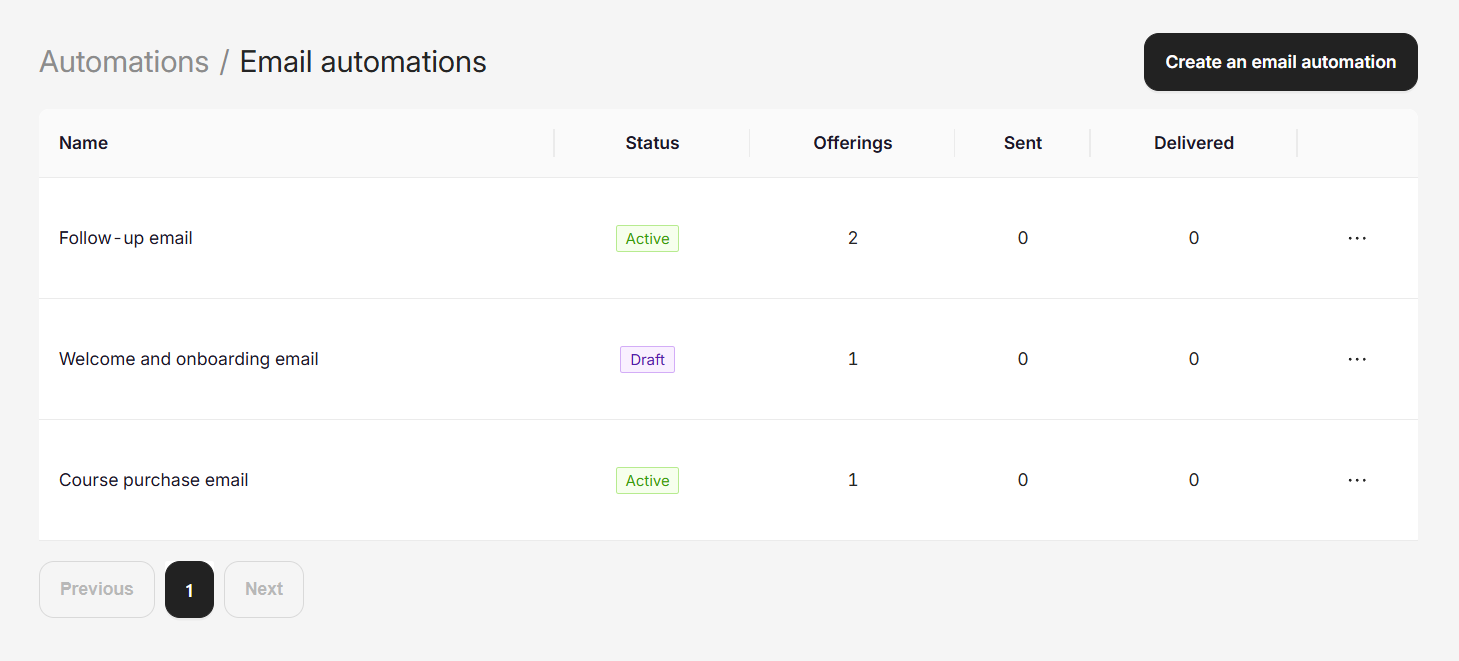
This image above shows the Email Automations hub dashboard — where coaches see all their active automations, status, number of offerings assigned, emails sent, and deliveries. This visual shows coaches that they can manage everything from one place.
Making Emails Feel Personal Without the Work
The best automated emails are the ones that feel like they were written personally for the person receiving them. That is hard to do when you are sending the same email to 500 people. Unless you use personalization.
Coachli supports what we call shortcodes, which are tiny placeholders you insert into your email that get replaced with real data when the email sends.
Instead of writing "Hi there," you write "Hi {CUSTOMER_NAME}" and every client sees their own name. Instead of "From Coach Sarah" as your signature, you write "From {COACH_NAME}" and the system fills in your name automatically. You can even include your email address, your coaching niche, or any other data about you and your client.
So an email that would normally feel generic — "Welcome to your new program" — becomes "Welcome to your coaching program, John. I am looking forward to working with you. Your first session is on Saturday at 2pm." Every client feels like it was written for them. Because technically, it was.
Customizing Every Part of Your Email
You own the entire email. Not just the body, but the subject line, the call-to-action button, the links, everything.
Write the subject line that will get your email opened. Not our generic subject line, but yours. Make it specific, make it compelling, make it yours. "Your coaching starts today" works better than "Welcome to your program." "You forgot to complete checkout" works better than "Incomplete purchase notice."
Write the email body that will convert. Tell a story. Answer the real question. Build confidence. Or gently nudge. You decide the tone because you know your clients better than we do.
Add buttons that make the next step obvious. "Join your first session." "Get started with the materials." "Complete your purchase." Custom button text, custom links, all of it in your control.
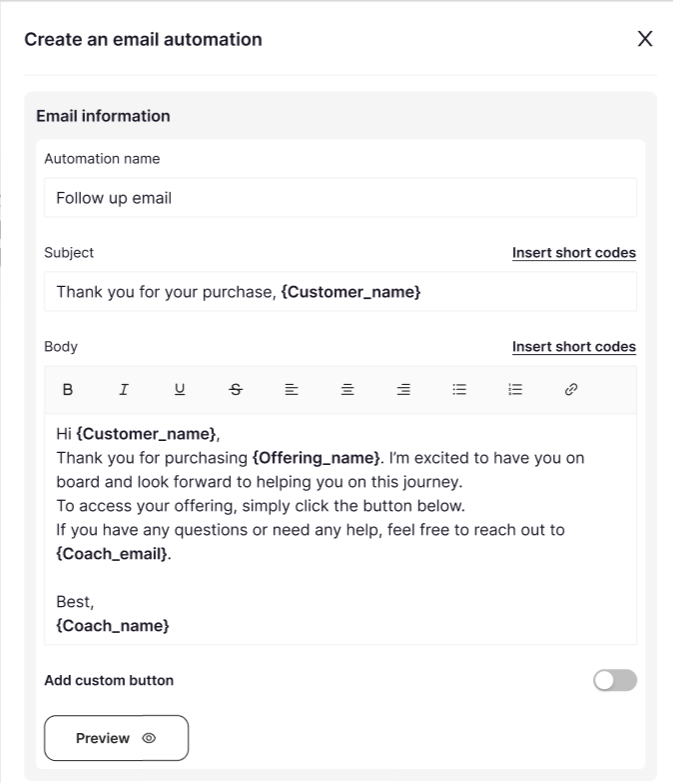
The image above shows the email creation form where coaches write their automation. It shows the subject line field, the body copy editor with formatting options, the available shortcodes (personalisation placeholders), and the "Add custom button" toggle. This is where the creative control lives.
And if you want to refine the email before it goes live, you can preview it. See exactly what it will look like. See the placeholders filled in with real data. Make sure it feels right before a single email is sent.
How to Set It Up (Spoiler: It Is Simple)
Setting up Email Automations happens when you create your offering. When you create a new digital product, session offering, or coaching package, you will see a section for Email Automations.
The first thing you do is choose your trigger. Do you want this email to fire "After Purchase" — immediately when someone buys, or after a delay you set? Or do you want it to fire on "Abandoned Purchase" — when someone starts checking out but does not complete the transaction?
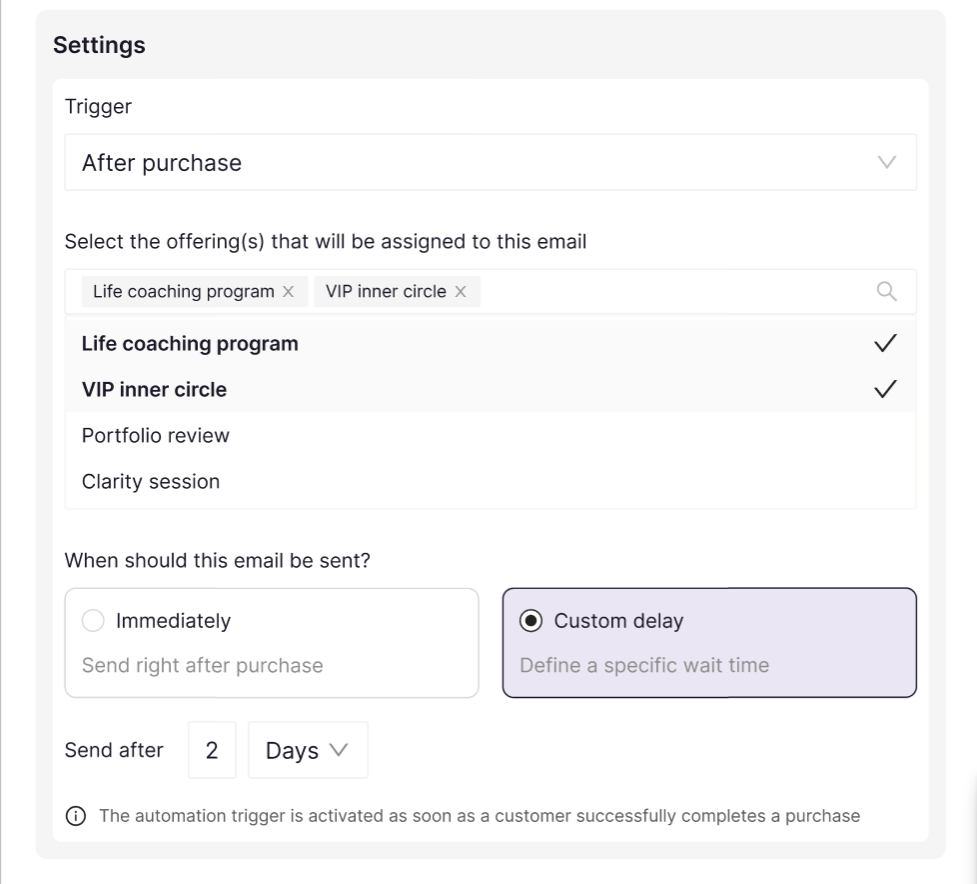
The above image shows the Settings section with the Trigger dropdown and the "When should this email be sent?" options. It displays both the "Immediately" option and the "Custom delay" option with time settings. This shows coaches how simple it is to control when their emails go out.
Once you choose your trigger, you select which offerings should use this automation. You can apply one automation to multiple offerings at once, or create different automations for different products and services.
Then you set the timing. For "After Purchase," do you want the email to go out immediately or after a delay? (Immediate works for confirmations. A delay of a few hours or a day works for onboarding so that you want to feel personal rather than robotic.)
For "Abandoned Purchase," you set how long to wait before sending the reminder. Thirty minutes? Two hours? Three days? You decide based on what makes sense for your offering.
Then you write your email. Click to create, add your subject line, write your message, personalize with shortcodes, add a button if you want one, and preview it.
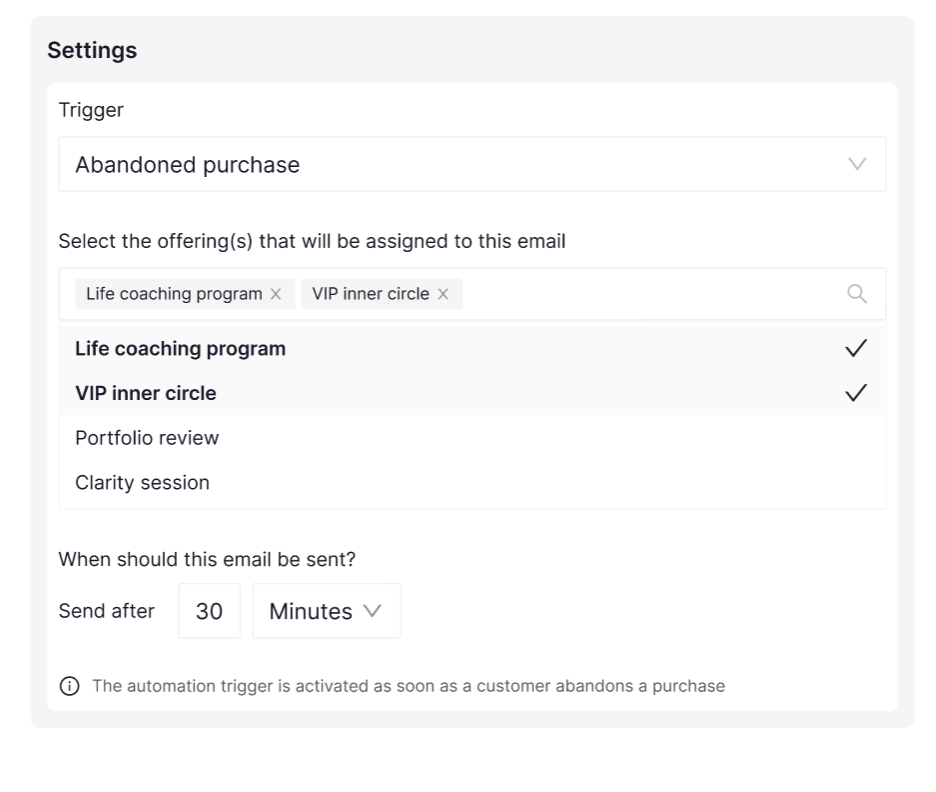
This shows the Settings panel with the dropdown for selecting which offerings get the automation, the "When should this email be sent?" section with options for Immediately vs. Custom delay, and the timing controls (30 minutes, 2 days, etc.). This gives coaches visibility into how flexible and controlled the setup is.
That is it. The automation is now live. The moment someone buys, the email sends. The moment someone abandons, the reminder goes out after the time you set.
You can also add automations to offerings you created before this feature existed. Edit the offering, scroll to Email Automations, and set them up. They will start working immediately.
Real-World Use Cases for Your Coaching Business
Email Automations work differently depending on what you are selling. Here are the most common ways coaches are using them today.
For Digital Product Creators
You sell a course, checklist, template, or guide. The moment someone buys, they get a welcome email confirming their purchase and giving them the link to access the material. If they have a question about setup or next steps, you have already answered it in that email. No support overhead. Higher completion rates because people start faster.
If someone starts to purchase but does not finish, you send a reminder. Often with a simple "Need help?" angle. Many creators recover 15 to 20 percent of abandoned purchases with just one well-timed email.
For 1:1 Coaches and Consultants
Someone books a session. Immediately, they get a confirmation with the exact time, your video link, what to prepare, and what they can expect from the call. This email does something powerful: it prevents no-shows and late cancellations because the client has everything they need. They know exactly when and where to show up.
You could also send a follow-up email after the session with your notes, action items, and a link to book the next session. That part requires you to customize the email content per client, so right now it would still need some manual work. But the immediate confirmation and reminder is fully automated.
For Group Workshop and Live Class Hosts
Someone purchases tickets to your live workshop or masterclass. They get a welcome email with the date, time, what to prepare, and the Zoom or video link. When the event is close, you send a reminder. Anyone who bought but did not attend gets a follow-up with the recording or recap.
This is where abandoned purchase recovery also shines. Someone added tickets to their cart but closed the browser tab. A reminder email goes out after two hours. "Spots are filling up. Would you still like to join?" Recovered sales, every time.
For Coaching Programme Subscribers
Your client signs up for a three-month coaching programme. They get a welcome email with the curriculum, when sessions happen, how to access materials, what to do before the first call. They feel onboarded and ready. No back-and-forth clarification emails needed.
If they complete their purchase but have not shown up to their first session yet, you could set up a reminder to nudge them. Small, personal, low-pressure. Just ensuring they actually get started.
Why This Matters for Your Bottom Line
Most coaches think about Email Automations as a convenience. It saves time. Which it does. But the real impact is financial.
An abandoned purchase recovery email, sent to even twenty people a month with a 20 percent conversion rate, is four recovered sales. At ₦20,000 per offering, that is ₦80,000 a month that would have disappeared otherwise. Over a year, that is nearly ₦1 million in revenue that only exists because of one automated email.
A well-timed welcome email that onboards clients properly reduces support questions, increases completion rates for courses, and makes clients feel taken care of before you have even met them. All of that creates better reviews, more referrals, and happier clients who stick around longer.
And the time savings are not trivial either. If you are sending five emails a day manually, that is an hour of work a week. Multiply that by twelve weeks, and you have gotten fifty hours of your life back. That is two full weeks of time, reclaimed and redirected toward actual coaching or building new offerings.
That is not a convenience feature. That is a business accelerator.
Starting with Automation Means Scaling Stays Possible
The coaches and creators who grow fastest are almost always the ones who stopped doing manual work before they had to. They set up systems when they have fifty clients because they knew they would eventually need to when they had five hundred.
Email Automations are one of those systems. You set them up now, when you are still figuring things out. And then when your business grows, that growth does not create a new workload. It just means more emails are sent automatically, more follow-ups happen on schedule, and you stay organised without extra effort.
That is the difference between a business that stays manageable and one that becomes overwhelming.
Getting Started Today
Email Automations are available now in Coachli for all creators, coaches, and anyone managing offerings on the platform.
To set them up, go to your offerings and look for the Email Automations section. Create a new automation, pick your trigger, write your email, and activate it. You can start with a single automation — maybe just the welcome email for your main offering — and expand from there as you see what works.
Preview your emails before they go live. Test the personalization. Make sure they feel like you. Then let them run.
And if you want to recover abandoned purchases, set up that trigger too. You might be surprised how many sales are just waiting for a gentle nudge.
Frequently Asked Questions
Can I send different emails for different offerings?
Yes. Each offering can have its own automations. Your digital product can have a different welcome email than your coaching programme. Your workshop can have its own abandoned purchase recovery email. You control what each offering sends and when.
What if I want to send a follow-up email days or weeks later?
Right now, the After Purchase trigger lets you set a delay before the email sends. So you can have a welcome email go out immediately, and a second email go out three days later. Both are automations you set once. We are exploring additional triggers for longer-term follow-ups based on your feedback.
Are the emails sent from my email address or from Coachli?
Emails come from your verified email address on Coachli. It will look like it came from you because it did. When a coach receives an email from an automated system, they see it came from you, the coach. That is how trust works.
What if I want to customize an email after it is already live?
You can edit automations at any time. The moment you save the changes, new emails sent will use the updated version. Previous emails already sent will not change, but everything going forward will reflect your new version.
Can I see how many emails were sent and if they were opened?
You can see all automations and their status in your Coachli dashboard. We are building more detailed analytics around email performance. For now, you can see which automations are active, and Coachli processes the sends reliably.
What if someone unsubscribes from emails?
We respect unsubscribe requests. Anyone who unsubscribes will not receive further automations. You can always check your list of unsubscribes in your account settings.
Email Automations are live now. If you have been waiting for something to finally make your communication scale without the chaos, this is it.
Set up your first automation today in your Coachli account and see what changes when you stop doing the work that machines can do.

Comments ()